

Get Started: MCP Gateway
Zilla MCP Gateway unifies REST APIs, streaming topics, and existing MCP servers behind one MCP endpoint, no custom middleware or SDK wrapper required.
Two things set it apart from other MCP gateways: a real Kafka topic can be exposed as MCP tools directly, with no custom wrapper service in between, and a caller's JWT scope decides what's even visible in tools/list, not just what's callable, so unauthorized tools are absent rather than listed and denied.
This guide aggregates three very different kinds of upstream behind a single Zilla MCP Gateway endpoint, reachable over Streamable HTTP on port 7114:
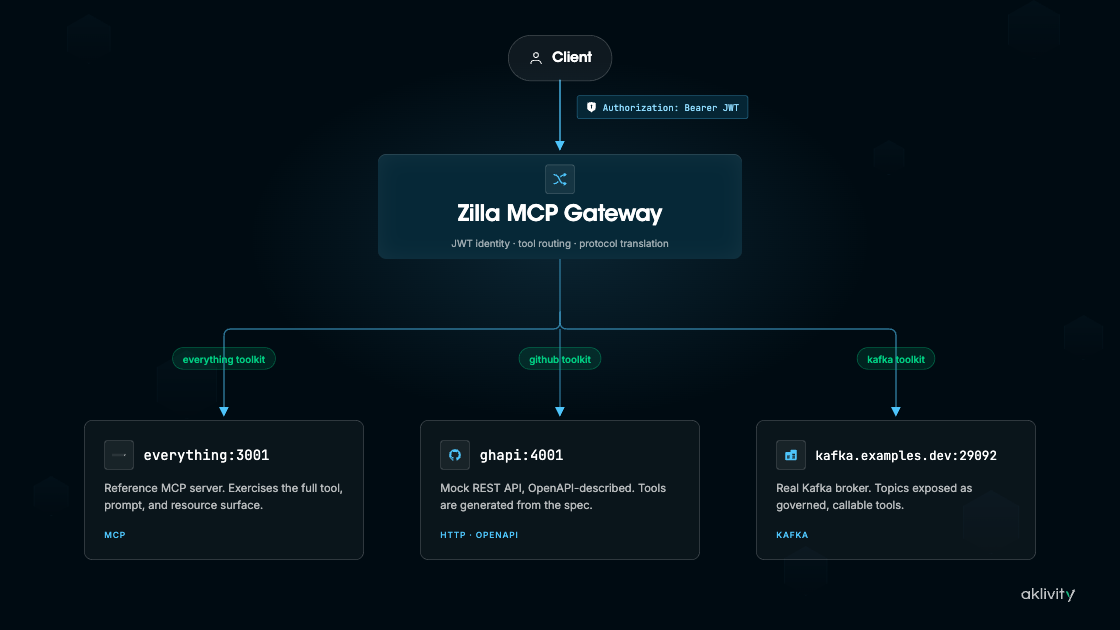
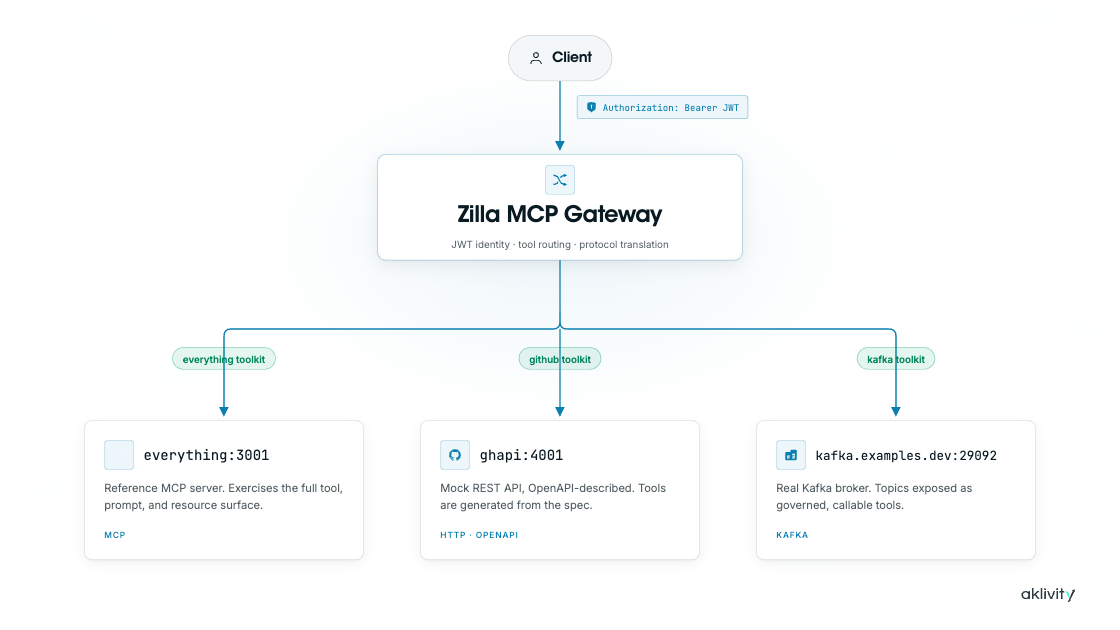
everythingtoolkit:@modelcontextprotocol/server-everything, a public reference MCP servergithubtoolkit: a mock REST API, described entirely byetc/specs/github.openapi.yaml, no MCP server involvedkafkatoolkit: a real, single-node Kafka broker, exposed as nativeproduce_message/consume_messagesMCP tools
Every toolkit goes through the same authn_jwt guard and the same listing cache. A caller's scope claim decides what actually shows up in tools/list, no matter which kind of upstream a tool resolves to, and Tool Discovery keeps that list short even as more toolkits are added.
Prerequisites
Get the Files
Download mcp-gateway-demo.tar.gz
Extract it and cd mcp-gateway-demo before continuing.
Info
The gateway configuration is in etc/zilla.yaml. You can also view it on GitHub before downloading.
Start the Stack
docker compose up --waitAuthorize
Every request needs a JWT bearer token, scoped to the toolkits and operations it should be able to see. Mint one with the bundled jwt-cli service:
export JWT_FULL=$(docker compose run --rm jwt-cli encode \
    --alg "RS256" --kid "example" \
    --iss "https://auth.example.com" --aud "https://api.example.com" \
    --exp=+1d --no-iat \
    --payload "scope=github:tools github:pr:write github:issues:write kafka:tools" \
--secret @/private.pem | tr -d '\r\n')| Scope | Unlocks |
|---|---|
github:tools | Read-only GitHub operations (list/get repos, issues, pull requests) |
github:pr:write | Create/update pull requests, merge, review |
github:issues:write | Create/update issues and comments |
kafka:tools | Produce and consume the orders topic |
A caller only ever sees the tools and resources its token authorizes. Anything else is simply absent from tools/list, not present but denied. A caller with no token at all still sees the ungated everything toolkit, since it carries no guarded route of its own. The Demo Flow below walks through this scope by scope.
Demo Flow
A guided walkthrough of every toolkit, the JWT-scoped access model, and the eager/cold tool cache. It uses the Claude Code CLI first, then MCP Inspector for interactive scope switching.
Before you start, make sure the stack is up (see Start the Stack) and $JWT_FULL is exported (see Authorize).
1. Register the gateway with Claude Code
Register Zilla as an MCP server and let an agent exercise all three toolkits in one session:
claude mcp add zilla-mcp-gateway --transport http http://localhost:7114/mcp \
    --header "Authorization: Bearer $JWT_FULL"
Note
Claude Code is just one option. Any MCP client that speaks Streamable HTTP, MCP Inspector, Claude Desktop, Cursor, and so on, can connect to http://localhost:7114/mcp with the same Authorization: Bearer header.
Try these prompts
What zilla-mcp-gateway tools do you already have available?
Use zilla search to check for github list issues tool
Create a GitHub PR on acme/widget: title "Add feature", head "feature", base "main"
Open a GitHub issue on acme/widget titled "Found a bug" with body "details"
Produce a message "hello from mcp-kafka" to the orders Kafka topic
Consume 1 message back from the orders Kafka topic
You've just seen it work end to end. The rest of this walkthrough switches to MCP Inspector to show exactly why, one mechanism at a time.
2. Disable eager tool caching
Start by taking curation out of the picture entirely, so the next couple of steps show the full, uncurated tools/list, before turning it back on.
Either open etc/zilla.yaml and comment out the tools: block under north_mcp_proxy.options.cache by hand, or run this command to do it for you:
sed -i.bak '/^ tools:$/,/^ toolkit: zilla$/s/^/#/' etc/zilla.yaml && rm etc/zilla.yaml.bakEither way, restart Zilla to pick up the change:
docker compose restart zilla3. Connect MCP Inspector without token
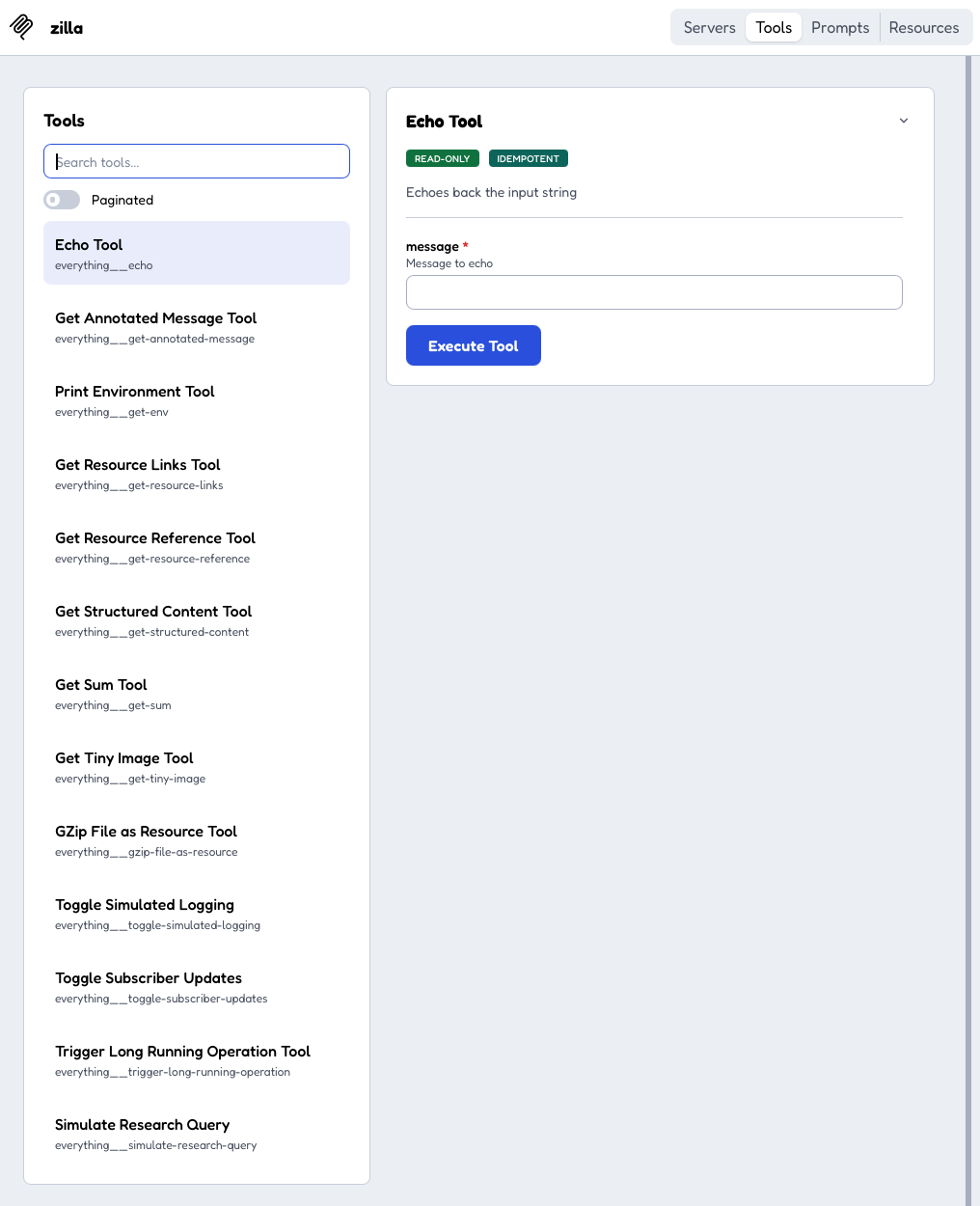
Connect with no credentials at all, to see what an anonymous caller can reach on its own:
npx @modelcontextprotocol/inspector --web \
--transport http --server-url http://localhost:7114/mcptools/listreturns only the ungatedeverythingtoolkit's full tool set (a dozen-plus)githubandkafkaare bothguarded, so they are invisible with no token at all
4. Reconnect with the full-access token
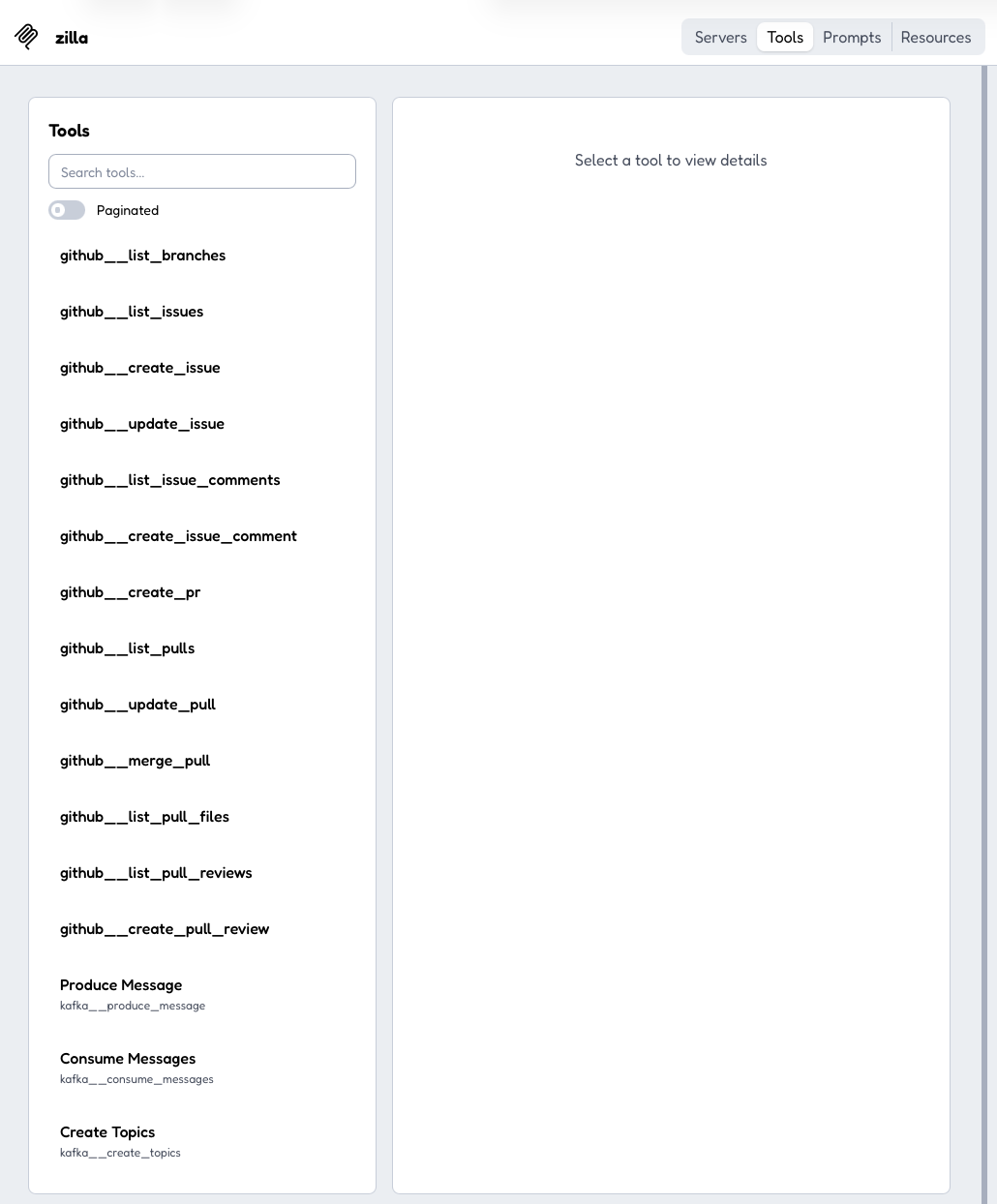
Now bring the full-access token into the same uncached view, to see the other end of the range: every tool across every toolkit it covers. Stop that instance (Ctrl+C) and reconnect with --header:
npx @modelcontextprotocol/inspector --web \
    --transport http --server-url http://localhost:7114/mcp \
--header "Authorization: Bearer $JWT_FULL"tools/listgrows to every tool across every toolkit the token covers- A long, flat, uncached list, since eager caching is still commented out
5. Turn eager caching back on
You've now seen both ends of the uncached range, nothing and everything. Restore the curation and confirm it still applies. Either uncomment the tools: block in etc/zilla.yaml by hand, or run this command to do it for you:
sed -i.bak '/^# tools:$/,/^# toolkit: zilla$/s/^#//' etc/zilla.yaml && rm etc/zilla.yaml.bakEither way, restart Zilla to pick up the change:
docker compose restart zilla6. Reconnect and search for a cold tool
Reconnect to watch the curated list return, then prove that nothing was actually removed, only hidden from the default list. Stop any running Inspector instance and reconnect with the full token:
npx @modelcontextprotocol/inspector --web \
    --transport http --server-url http://localhost:7114/mcp \
--header "Authorization: Bearer $JWT_FULL"- Back to the small, curated set:
everything__echo,github__create_pr,kafka__produce_message,kafka__consume_messages, plus the threezilla__*search tools - Search for a tool that isn't eagerly listed (e.g.
github__list_issues). It's still found and callable: "not eager" means discoverable by keyword, not gone - Call a
github__*tool to confirm the round trip still works end to end
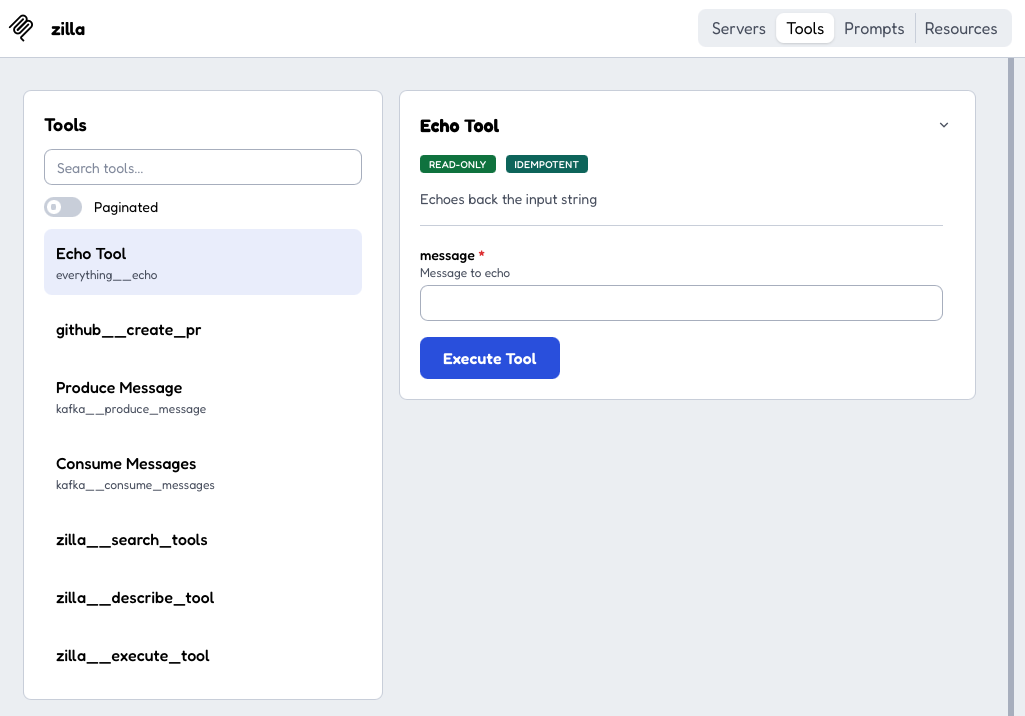
github__list_issues never appeared in that tools/list response, so a client has no way to know it can be invoked directly.
Walking through the full round trip for it, one zilla__* call at a time:
zilla__search_toolsfinds it by keyword even though it's cold, not eagerly listedzilla__describe_toolreturns its schema, the same as if it had been listedzilla__execute_toolinvokes it with these arguments, proving "not eager" means discoverable and callable, not gone:{"owner": "acme", "repo": "widget", "state": "open"}
7. Narrow the token to one toolkit
Every step so far used the same all-access token. Narrow it to a single toolkit next, to see scoping actually change what's visible. Mint a kafka:tools-only token and reconnect Inspector with it:
export JWT_KAFKA=$(docker compose run --rm jwt-cli encode \
    --alg "RS256" --kid "example" \
    --iss "https://auth.example.com" --aud "https://api.example.com" \
    --exp=+1d --no-iat \
    --payload "scope=kafka:tools" \
    --secret @/private.pem | tr -d '\r\n')

npx @modelcontextprotocol/inspector --web \
    --transport http --server-url http://localhost:7114/mcp \
--header "Authorization: Bearer $JWT_KAFKA"- Tool list narrows to the
kafka__*tools everything__echoand thezilla__*search tools stay visible too, since they're available to every caller regardless of scope- No
github__*tools appear at all, proving fine-grained, per-toolkit access
8. Produce and consume, then verify in Kafka UI
Confirm the narrowed token still does real work end to end, not just shows up in tools/list:
- Produce and consume from the Inspector UI
- Confirm the record landed on the
orderstopic in Kafka UI
Producing and consuming a record from Inspector with the kafka:tools-only token, then verifying it in Kafka UI:
9. Confirm the guard blocks the call, not just the listing
One last check: the same request the narrowed listing hid should also be rejected outright, not just missing from the list. Still on the kafka:tools-only session, call zilla__execute_tool with:
{"name": "github__create_pr", "arguments": {"owner": "acme", "repo": "widget", "title": "Should fail", "head": "x", "base": "main"}}- The same tool that was one call away moments ago under the full-access token now comes back
"Tool not found" - Filtering
tools/listonly narrows what's visible - The toolkit-level guard enforces what's callable, independent of whether a tool ever appeared in this caller's list
Calling github__create_pr under the kafka:tools-only token and getting rejected, even though the tool never appeared in this caller's tools/list to begin with:
10. Observe MCP metrics
Every call made throughout this walkthrough, from Claude Code in step 1 through every Inspector session after it, was already being recorded.
The mcp(server) binding is configured with telemetry.metrics: [mcp.*], so it emits a counter and a duration histogram per MCP method, attributed by method, tool, and outcome, with no instrumentation added to the everything server, the github API, or Kafka itself.
Scrape them from the Prometheus endpoint:
curl -s http://localhost:7190/metrics | grep '^mcp_'- Per-method counters (
mcp_initialize,mcp_tools_list,mcp_tools_call, and so on) show how many requests of each kind the gateway has handled - Each series is labeled by
toolandoutcome, sogithub__create_prsucceeding under the full-access token and failing under thekafka:tools-only token in step 9 show up as two distinct label combinations, not one blended count - Duration histograms (
mcp_tools_call_duration, and similar) capture latency for those same calls
What This Demo Shows
- ✓Kafka and streaming data as MCP tools: the
kafkatoolkit exposes real-timeproduce_message/consume_messagesdirectly against the broker as native MCP tools, no custom wrapper service or hand-built MCP server in between. - ✓MCP resources generated from OpenAPI spec: the
githubtoolkit's read paths (repo_by_name,issue_by_number,pull_by_number) come from its OpenAPI spec as native MCP resources, not every GET forced into a tool. - ✓Context-efficient tool discovery: the eager/cold split plus
zilla__search_tools,describe_tool, andexecute_toolkeep the tools list short instead of loading every tool's schema into the model's context up front. - ✓Streaming-native protocol mediation: MCP, HTTP, and Kafka are connected declaratively in one Zilla runtime, not stitched together with per-upstream glue code.
- ✓Centralized auth: a caller's JWT scope decides what's even visible in
tools/list, not just what's callable, so unauthorized tools are absent rather than listed and denied.
Stop the Stack
docker compose downRelated Reference
- Tool Discovery covers the
eager/cold split and thezilla__search_tools/describe_tool/execute_toolfamily this demo exercises. - OpenAPI Specs as Tools covers deriving the
githubtoolkit's tools and resources from an OpenAPI document instead of hand-authoring them. - Streaming Data as Tools covers the
kafkatoolkit'sproduce_message/consume_messagestools in more depth. - Secure Agent Access covers the one-token-many-toolkits model this demo's JWT scopes are built on.
- Observable AI Agents covers the
mcp.*metrics this demo scrapes in more depth. mcpbindings,mcp-openapi, and thejwtguard reference pages.- MCP: Streamable HTTP transport