

LLM Token Usage Visibility
Token usage is what LLM providers charge for, and what applications run out of. Without a gateway, each provider's console shows only its own usage, per account, after the fact.
The Problem
When applications call providers directly, usage is scattered: OpenAI usage in one console, Anthropic usage in another, and nothing that shows which application or tenant used what, or how fast each provider is answering. Adding that view means instrumenting every application.
How Zilla Solves It
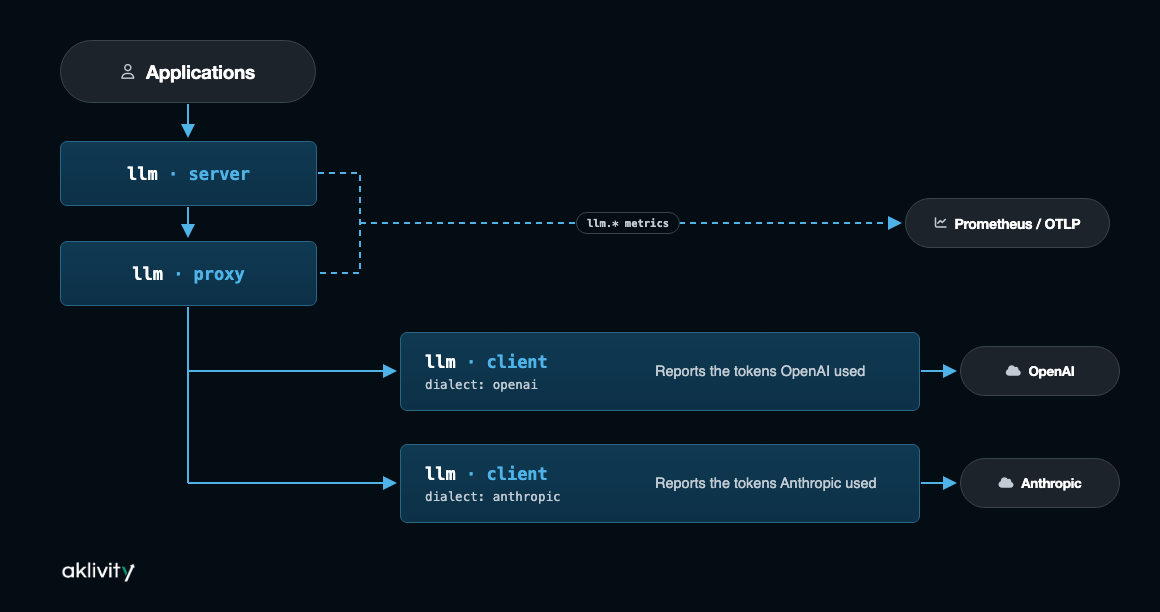
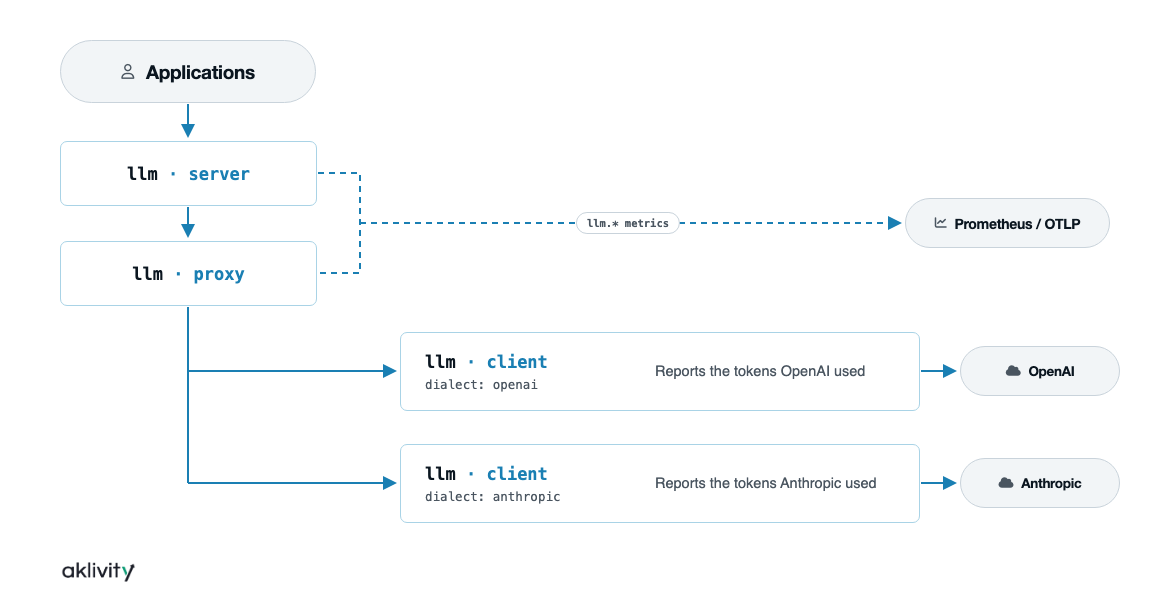
Every exchange through the LLM Gateway is measured as it passes. The llm.* metrics record input, output, cached, and reasoning tokens as each provider reports them, along with duration, time to first token, interactions, and requests in progress. Metrics on each llm · client show that provider's usage, and attributes from the caller's authorization can label usage per tenant. Exporters send the metrics to Prometheus, OTLP, or AWS CloudWatch.
Architecture
Configuration
telemetry:
  metrics:
    - llm.interactions
    - llm.duration
    - llm.time.to.first.token
    - llm.tokens.input
    - llm.tokens.output
  exporters:
    prometheus_exporter:
      type: prometheus
      options:
        endpoints:
          - scheme: http
            port: 7190
            path: /metrics

bindings:
  openai_llm_client:
    type: llm
    kind: client
    options:
      dialect: openai
      server: https://api.openai.com
    telemetry:
      metrics:
        - llm.*
    exit: sys:http_client
Limits
- Token counts are the ones the provider reports. A count the provider doesn't report isn't recorded, and
llm.usage.incompletecounts replies that ended without a complete report. - Zilla records tokens, not cost.
- Metrics can be labelled with values from the caller's authorization, such as a tenant, but not by model.
See LLM Metrics for every metric and attribute.
Try It
The LLM Gateway demo includes a Grafana dashboard of tokens, latency, and time to first token per provider.
Try the guide
Walk through Track Token Usage to record the llm.* metrics and read them in Prometheus.