

API Products
An API Product is a self-contained, reusable data or service asset designed to deliver consistent, reliable, and secure functionality to internal or external consumers. API Products are defined, versioned, and published from API Products, then discovered and subscribed to from the API Catalog.
Product Types
A Kafka API Product is backed by an AsyncAPI specification over the Kafka protocol, and is the only type available today. Other protocols are not yet supported end to end.
Finding and Managing Products
Filter the product list to All, Team, or Mine, or search by name. Each card shows its publish status, category and protocol tags, owning team, version count, and subscriber count. From a product, open Details to manage it, or toggle its published state directly from the list.
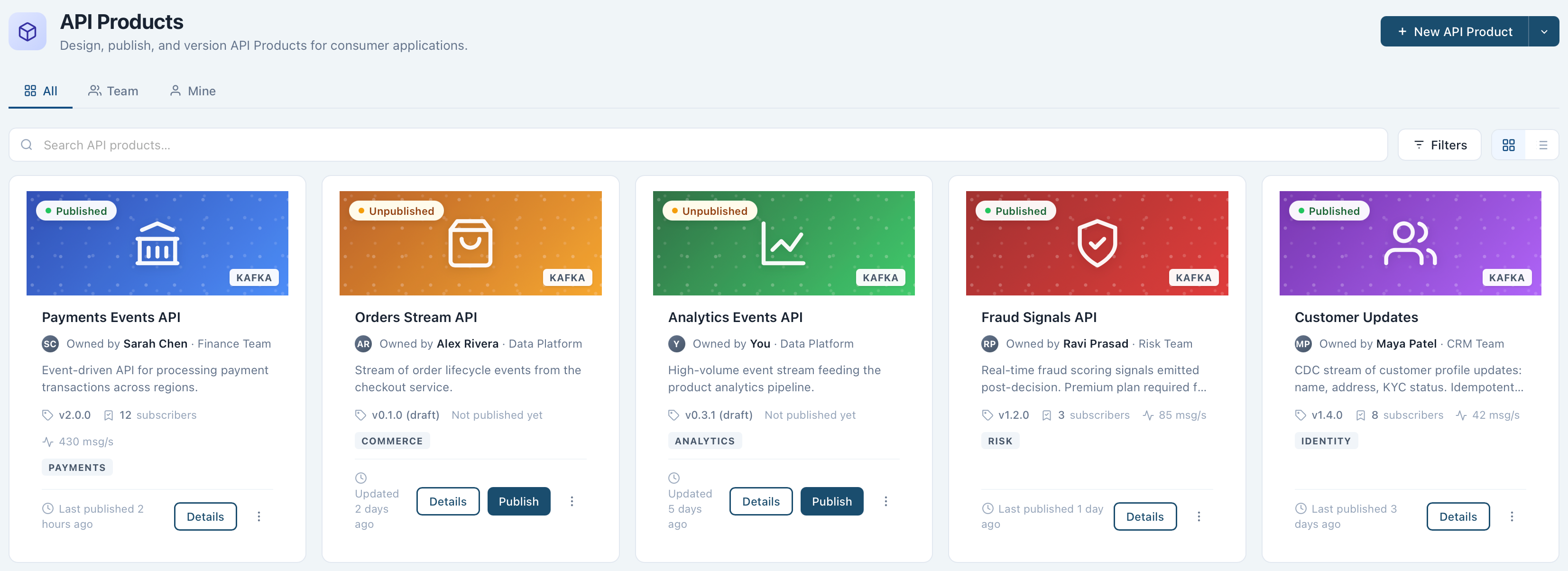
Create an API Product
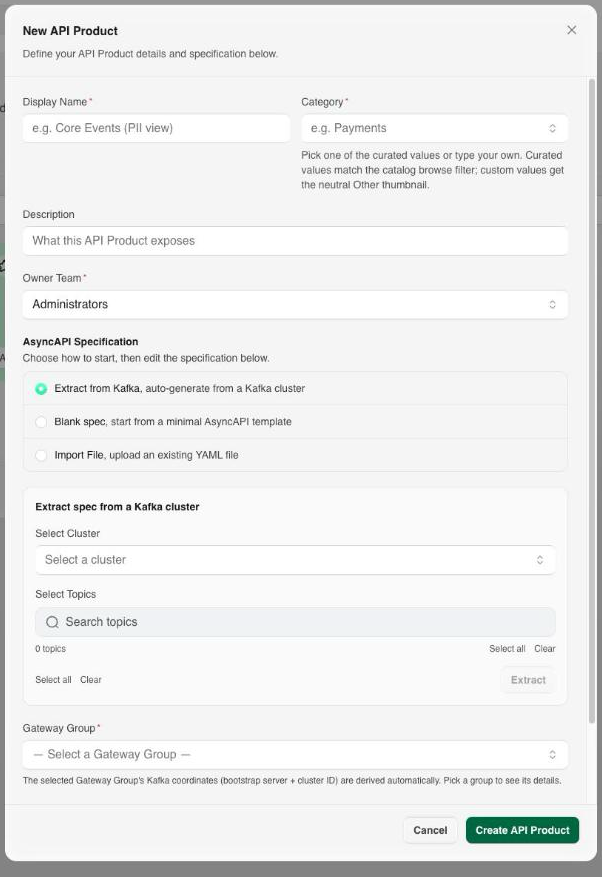
- From API Products, select New API Product.
- Enter the details:
- Display Name: a unique name for the API Product.
- Category: pick a curated value (for example
Payments) or type your own; curated values match the API Catalog's browse filter. - Description (optional): a short summary of what the API Product exposes.
- Owner Team: the team responsible for the product.
- Under AsyncAPI Specification, choose how to start the spec:
- Extract from Kafka: select a cluster and one or more topics, then select Extract to auto-generate the spec from live topic and schema metadata.
- Blank spec: start from a minimal AsyncAPI template.
- Import File: upload an existing AsyncAPI YAML file.
- Select a Gateway Group: its Kafka coordinates (bootstrap server and cluster ID) are derived automatically from the group you pick.
- Set the product's default plan:
- Security: how subscribers authenticate. See Security Options.
- Certificate Authority: required when Security is mTLS, chosen from the CAs registered on the Gateway Group's environment.
- Rate Limit: required, a capacity and unit.
- Select Create API Product.
The product is created with a single Default plan carrying these settings. Adjust it later from the product's Details tab.
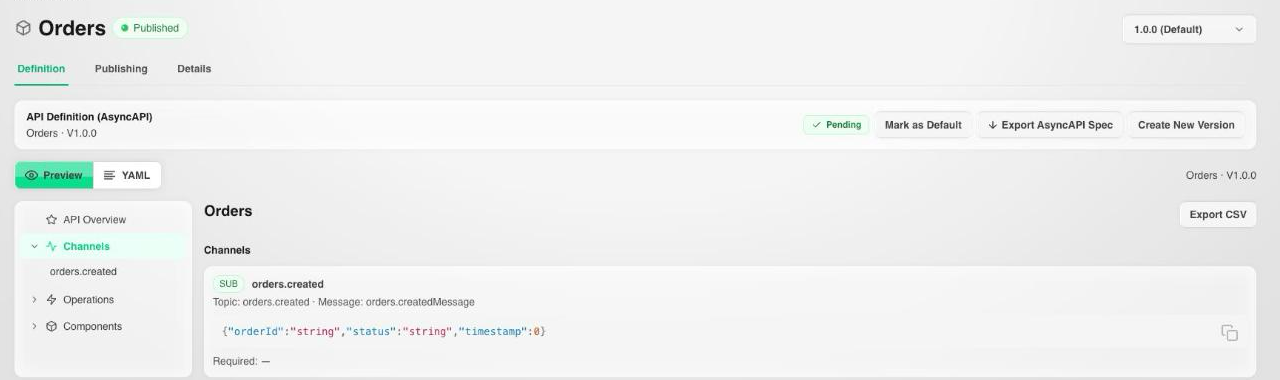
The new product opens on its Definition tab, where you can preview the AsyncAPI spec, edit it as raw YAML, and inspect its channels, operations, and components.
Topic Aliasing
By default a channel's address is also the Kafka topic it reads and writes. A channel can instead declare the physical topic it maps to, with x-zilla-platform.topic on its Kafka binding:
channels:
  orders:
    address: orders
    bindings:
      kafka:
        x-zilla-platform:
          topic: orders.${securityScheme.identity}
        partitions: 1
        replicas: 1
Consumers keep addressing the public channel name (orders); the Gateway rewrites each request to the aliased topic. The alias is a template, so it can be a fixed rename or, as above, per-caller.
${securityScheme.identity} resolves at the Gateway to the identity of the authenticated caller, taken from the credential the plan requires. Each subscriber therefore gets its own physical topic while sharing one channel address in the published specification, with no cross-tenant read possible: a caller cannot reach another identity's topic, because the topic name is derived from the credential, not from the request.
Warning
${securityScheme.identity} resolves against the API key credential a subscriber presents, so identity templating requires an API Key plan. On an mTLS plan there is no API key guard for the template to read, and the alias does not resolve. A fixed (non-templated) alias works on any plan.
Per-identity topics are provisioned when the product is published with subscriptions in place. Publishing before anyone has subscribed resolves the alias in the Gateway configuration but creates no physical topics yet; republish (Replace Existing Release) after subscriptions exist to provision them.
Schema Registry subjects follow the same aliasing, so a topic-aliased channel's schemas resolve against the aliased topic name. Aliasing is independent of payload format: JSON, Avro, and Protobuf channels all work, with or without a Schema Registry attached to the cluster.
Publishing
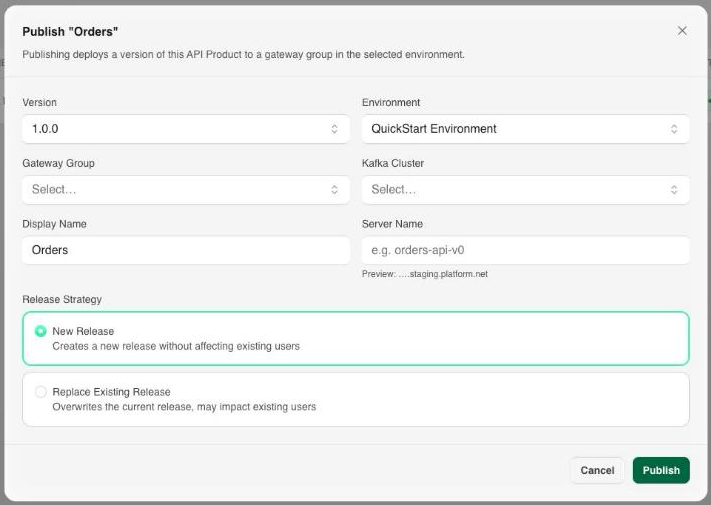
A product's Publishing tab lists every environment and Gateway Group it's currently published to, along with the release and status of each. Select Publish to make a version available:
- Version and Environment: which version of the product, and which environment, to publish to.
- Gateway Group and Kafka Cluster: the Gateway Group that will serve the product, and the cluster backing it.
- Display Name and Server Name: a human-readable label, and the short server label consumers address (for example
orders-api-v0), from which the connect hostname<server-name>.<environment>.platform.netis derived. - Release Strategy: New Release creates a new release without affecting existing subscribers, while Replace Existing Release overwrites the current release and may impact them.

Unpublish a release from the same tab to stop serving it without deleting the product itself.
Plans and Details
A product's Details tab holds its metadata (name, category, owner team, description, thumbnail), the Gateway Groups it's deployed to, and its Plan: the rate limit, security, quota, approval mode, and SLA consumers get when they subscribe. See Plans.
Next Steps
- Applications covers how a consumer subscribes to a plan on this API Product and receives generated credentials.
- Gateways covers the runtime component that serves the published API Product.