

API Catalog
The API Catalog, labelled API Catalogs in the left navigation, is where consumers discover and subscribe to published API Products: a single, organization-wide registry, not something you create or configure per team. Producers define, version, and publish API Products from API Products; the catalog is the consumer-facing view of what's been published.
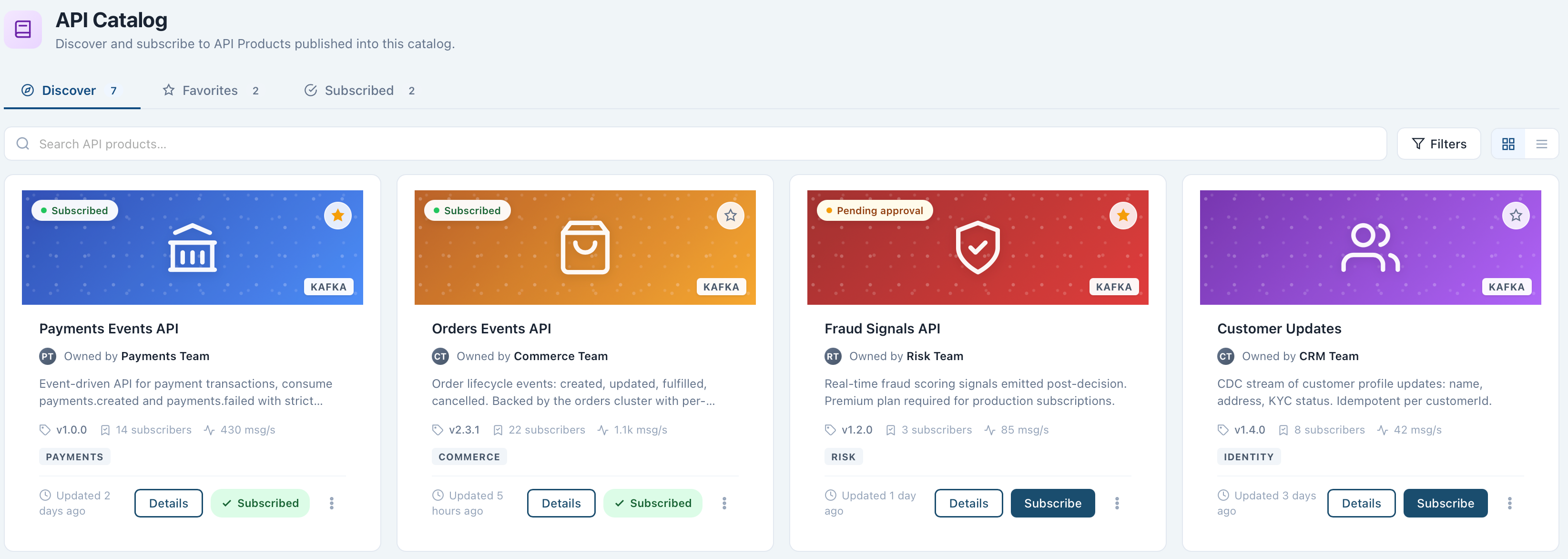
Discover and Subscribe
The catalog has two tabs:
- Discover lists every API Product published into the catalog, whether or not you're subscribed. Each card shows its subscription status, category and protocol tags, owning team, version, and subscriber count.
- Subscribed narrows the list to products you (or your Applications) already subscribe to.
Filter or search the list, favorite a product for quick access, or open a product to review it. From either tab, subscribe an Application to a product directly, or do it from the Application's own Subscriptions tab. Editing the underlying API Product itself, including its AsyncAPI spec and plan, happens from API Products, not from the catalog view.
Opening a catalog entry shows two tabs:
- Definition: the published AsyncAPI specification, browsable by overview, channels, operations, and components.
- Details: the entry's protocol and spec version, owning team, default and latest version, how many versions are available, its availability and approval mode, and the rate limit and security of its default plan.
Kafka-backed products are the only kind available today; other protocols are not yet supported end to end.
Next Steps
- API Products covers defining, versioning, and publishing the products that appear here.
- Applications covers how consumers subscribe to a catalog product and receive managed credentials.