

Subscriptions
Subscriptions define access for an Application to connect to a specific API Product.
Create a Subscription
From an Application's Subscriptions tab, select Subscribe to API Product and provide:
- API Product: the API Product to connect with, chosen from the catalog of published products.
- Subscription Name: a descriptive name for this subscription.
- API Product Version: the version of the chosen API Product.
- Description (optional): additional context or notes.
- Access Type:
- API Consumer: read-only access to the product's operations, consume messages, receive events.
- API Provider: full access to all topics for this API Product, able to produce and consume; requires producer-level permissions.
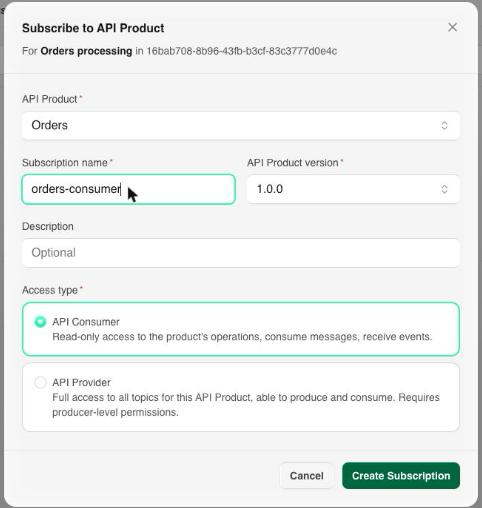
Select Create Subscription to finalize. The new subscription starts in whatever state the product's plan requires: Approved immediately under automatic approval, or Pending if it needs manual approval first. A pending request raises a Subscription request notification in the approver's Inbox, and the outcome comes back as a Subscription result notification for the requester.
Status
The Subscriptions tab lists each subscription with its owner team, plan, protocol, status, creation date, and keys, filterable by status:
| Status | Meaning |
|---|---|
| Pending | Awaiting manual approval under the product's plan. |
| Approved | Active: the Application can connect. |
| Paused | Temporarily stopped, credentials retained. Pausing the Application pauses all of its subscriptions. |
| Rejected | The approval request was declined. |
| Revoked | Access withdrawn and credentials invalidated. |
| Expired | The subscription passed its expiry. |
Credentials
Once a subscription is approved, the console generates the credentials the Application needs, matching the security option on the product's plan.
API Key plans
For an API Key plan, select the subscription's keys to open Subscription credentials:
- SASL Username (key id): the generated key id.
- SASL Password: the secret, shown once. Copy it before closing the dialog; if it's lost, rotate the credential instead, which invalidates the old secret for any client still using it.
Present them to the Gateway as SASL_SSL with the mechanism the plan specifies (PLAIN or SCRAM-SHA-256), against the product's server name. The Demo shows the full producer and consumer command lines.
Warning
The secret is displayed only at the moment of issue. Store it in your own secret manager as soon as the dialog appears.
mTLS plans
For an mTLS plan there is no API key and no SASL handshake. Subscribing issues a client certificate signed by the plan's certificate authority, and the Certificate tab of the subscribe dialog shows:
- Client certificate (PEM) and Private key (PEM), plus the CA chain (PEM) when the CA returns one.
- The certificate's Common Name, Serial, SHA-256 Fingerprint, and its Issued and Expires dates.
The Common Name is taken from the subscribing Application's name. Connect with security.protocol=SSL and the certificate as your keystore: no sasl.mechanism and no JAAS config.
Warning
The private key is shown once, at issue. Copy it before closing the dialog; it cannot be retrieved afterwards, and recovering access means issuing a new certificate.
Revoking the subscription revokes its certificate.
Next Steps
- Plans covers the rate limit and security requirement a subscription inherits from the product.
- Applications covers pausing, archiving, or deleting the Application that holds these subscriptions.