

Install
Attaching a Gateway registers it with a specific environment, so it can start serving the API Products deployed there.
Attach a Gateway
- From Gateways, select Install Gateways. The dialog is scoped to the current environment, and its title names it.
- Enter a Group Name (for example
us-east-prod) and an optional Description. - A Bootstrap Token is issued for the environment and shown in the dialog. Select Copy to take it. If it's lost, regenerate it from the environment's bootstrap section under Environments.
- Pick the Kubernetes distribution you're deploying to. Each tile links to that distribution's install guide:
- Amazon EKS, managed Kubernetes on AWS
- Kubernetes, a self-managed cluster
- Azure AKS and Google GKE are shown as coming soon
- Select Done to create the Gateway Group.
All install options opens the full set of deployment targets.
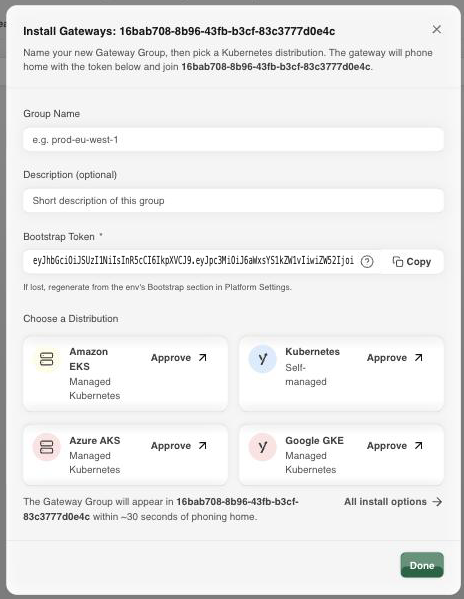
The Gateway phones home with the bootstrap token and joins the environment, typically within about 30 seconds of starting. Once attached, it appears as a new Gateway Group.
Next Steps
- Environments covers regenerating or revoking the bootstrap token used above.
- Configuration covers reviewing the Gateway Group's resolved configuration once it's running.