

ACLs
The ACLs tab lists all access control rules that define which principals can perform specific operations on cluster resources.
Overview
Each rule lists the Principal it applies to, the Resource Type, Resource Name, Operation, and Permission (Allow or Deny).
Add an ACL Rule
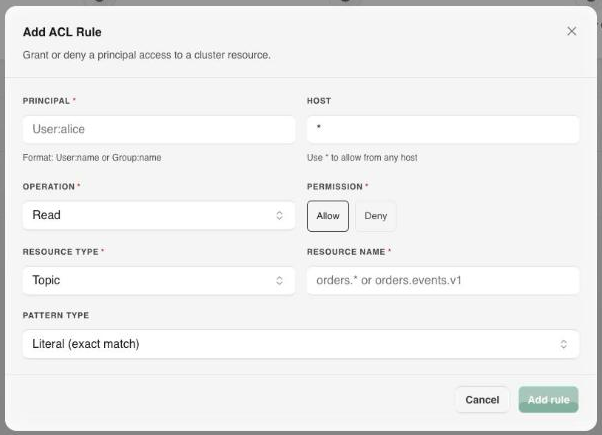
Select Add ACL rule and configure:
- Principal: the user or group the rule applies to, in
User:nameorGroup:nameformat (for example,User:alice). - Host: the host the rule applies from, or
*to allow from any host. - Operation: the Kafka operation being controlled (see Operations below).
- Permission:
AlloworDeny. - Resource Type:
Topic,Group,Cluster,TransactionalId, orDelegationToken. - Resource Name: the specific resource the rule covers, for example
orders.events.v1. - Pattern Type:
Literal (exact match)orPrefixed (prefix match), for rules that should apply to a family of resource names such asorders.*.
Operations
| Operation | Description |
|---|---|
| Read | Consume messages from a topic or fetch offsets for a group. |
| Write | Produce messages to a topic. |
| Create | Create new topics or partitions. |
| Delete | Delete topics or records. |
| Alter | Reassign partitions or otherwise modify a resource. |
| Describe | View topic metadata, group offsets, and cluster information. |
| ClusterAction | Perform cluster-level operations, normally reserved for brokers. |
| AlterConfigs | Modify resource configuration. |
| DescribeConfigs | Read resource configuration. |
| IdempotentWrite | Produce idempotently to the cluster. |
| All | Every operation above. |
Auditing Access
Use this view to:
- Verify that API Product consumers only have
Readaccess to their subscribed topics. - Confirm that producers are restricted to
Writeon their designated topics. - Identify overly permissive principals with cluster-wide
*resource rules. - Detect missing ACLs that could prevent Gateway connections from functioning.
Tips
The Gateway uses a dedicated service principal. Confirm it has Read, Write, and Describe permissions on topics backing your API Products.