

Stream Ops
Stream Ops is the dashboard's at-a-glance view of every Kafka cluster attached to the current environment: how many are healthy, how much traffic is flowing, and whether any consumer is falling behind.
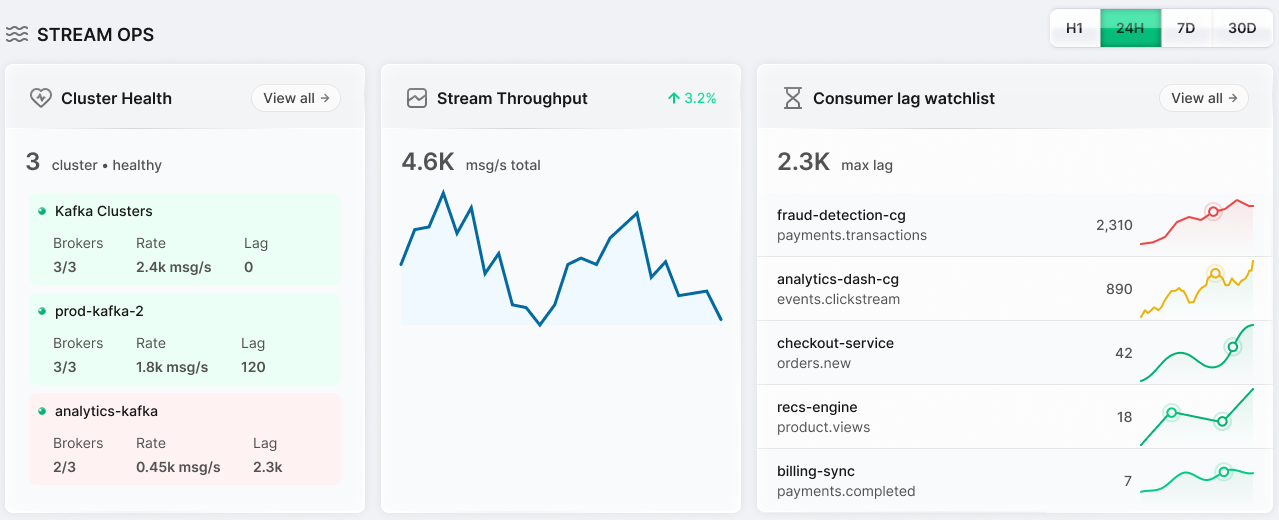
What You Can See
- Cluster Health: each attached cluster, with its broker count, message rate, and current lag; select View all to open Kafka Clusters.
- Stream Throughput: aggregate message rate across all clusters (msg/s), tracked with a short-term trend.
- Consumer Lag Watchlist: the largest lag observed across any consumer group on any cluster, a leading indicator that a consumer can't keep up with producers.
Each widget can be viewed over a short or long window (1H, 24H, 7D, or 30D).
When to Use It
Stream Ops is the first place to check when something feels off platform-wide, before drilling into a specific cluster. A drop in cluster health or a spike in aggregate lag here points you to which Kafka Cluster needs closer inspection under its own Brokers, Topics, or Consumer Groups tab.
Next Steps
- Kafka Clusters covers the per-cluster detail behind this summary.
- Governance covers monitoring policy and quota compliance alongside cluster health.