

Security
Security covers how Zilla Console itself authenticates the people and services that connect to it, separate from the auth a deployed API Product enforces on its own consumers.
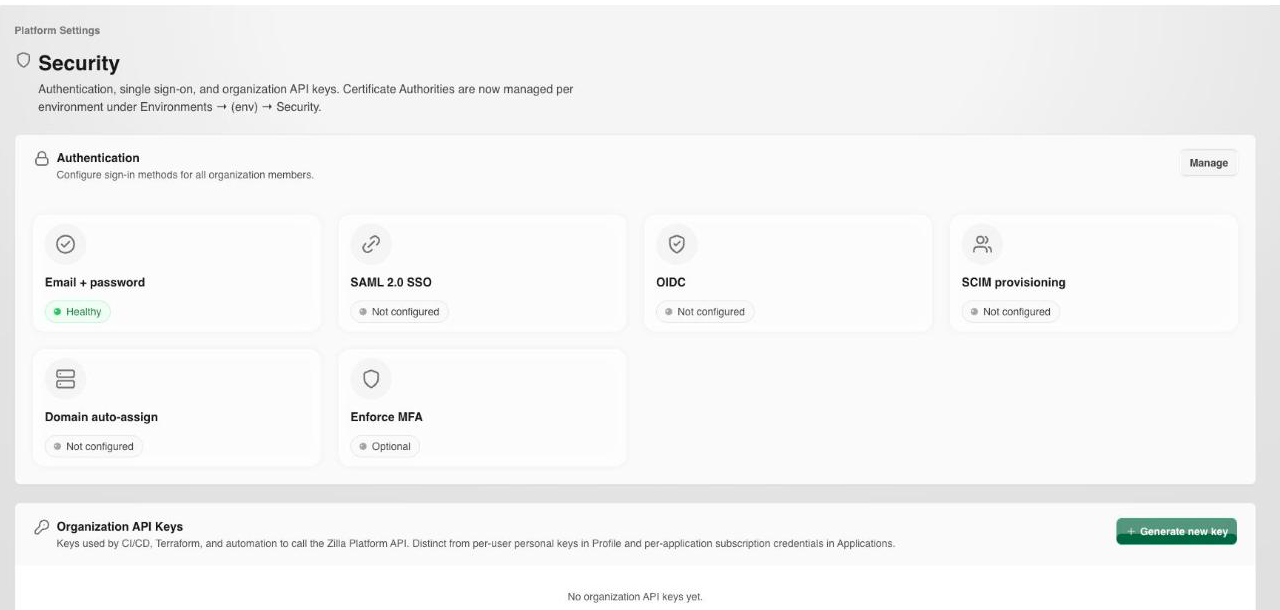
Authentication
The Authentication section lists the sign-in methods for the organization, each of which can be switched on or off:
- Email + password: direct account credentials.
- SAML 2.0 SSO and OIDC: delegate sign-in to an identity provider.
- SCIM provisioning: sync users and teams from your identity provider.
- Domain auto-assign: automatically place new users from a trusted email domain.
- Enforce MFA: require multi-factor authentication org-wide.
Warning
The per-method Configure action is not implemented yet: selecting it reports "coming soon" rather than opening the provider's settings. A SAML or OIDC connection therefore has to be established outside the Console for now, and the toggle here only records whether the method is enabled.
Organization policies, in the same dialog, do apply and are saved:
- MFA enforcement and Session lifetime.
- Domain auto-assign role and the Email domain it applies to.
- Password minimum length and Password complexity.
Organization API Keys
An organization-level API key authenticates automation, such as a CI pipeline or an external tool, against the Zilla Console API itself. It's distinct from a user's personal keys (managed under their Profile) and from the per-application subscription credentials managed under Applications. Select Generate new key to create one.
Certificate Authorities
Certificate authorities are managed per environment, not here. Open Platform Settings → Environments → [environment] → Security to register a CA the environment trusts, either a Local CA the platform generates a self-signed root for, or an AWS ACM PCA referenced by ARN.
A registered CA is what an mTLS plan signs its subscribers' client certificates with, and what the Gateway checks a presented certificate against. See Certificate Authorities for the full walkthrough, and mTLS for the equivalent concept configured directly on a gateway.
Next Steps
- Environments covers the per-environment certificate authorities and Security tab.
- Access covers the users and teams this authentication applies to.
- Audit Log covers reviewing changes to security configuration.